

Pomodoro Timer

Project Image

Project 2

May , 2025

Author

Dava Nalendra

Overview

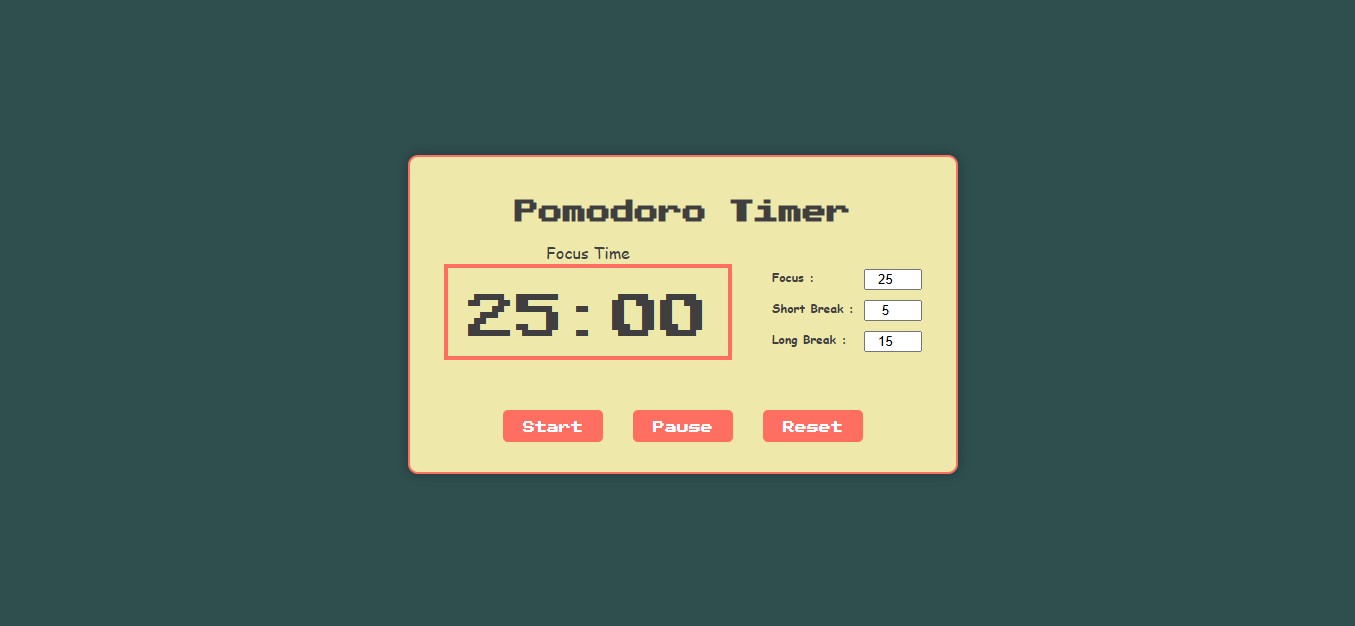
Pomodoro Timer is a simple, browser based productivity web app that helps users manage work sessions and breaks using the time-management method Pomodoro Technique. The application allows users to start a “focus” timer (default 25 minutes), then switch to short or long breaks automatically or manually. It works fully in the browser, no installation required, and is accessible on desktop and mobile devices.

Idea

The idea behind this project is to provide a lightweight, easy-to-use tool for people who want to improve their focus, productivity, or study behavior using the Pomodoro Technique. Rather than installing standalone apps or using complex software, users get a minimal, hassle free timer right in their browser, ready to go anytime.

Challenge

In building this app, challenges likely included: designing a clean, minimal interface that clearly shows the timer and options. Another challenge could be ensuring that the user experience remains smooth and intuitive even with minimal UI and no user account or backend.

Key Features

  • Simple and intuitive timer interface (Focus, Short Break, Long Break)
  • Default Pomodoro sessions (25 min focus) with easy transition to breaks
  • Start, Pause, Reset controls for flexible session management
  • Fully browser-based: no installation or account needed, works on desktop & mobile
  • Lightweight and minimal ideal for quick access and distraction-free focus

How It Works

  1. User opens the Pomodoro Timer web app in their browser.
  2. The timer displays a default “Focus Time” (25:00)./li>
  3. User clicks Start to begin a focus session.
  4. When the timer reaches zero (or the user clicks Pause/Reset), the session ends. The user then can switch to a short break or long break mode manually (or after a cycle).
  5. The user repeats the cycle alternating between work (focus) and rest (break), to manage productivity using the Pomodoro Technique’s rhythm.

Technologies Used

HTML CSS JS